AI Product Photography & Background Generator for Shopify Store Owners
Aspect Ratio:
Select Background Prompt
Image Scale:
Controls how much of the canvas your image will occupy. Smaller percentages create more padding around your image.
Your content will remain private and only visible to you
Preview
Preview
Your image will appear here
Please Generate an image to display the preview
Product Background Generator
Put a product photo into a new AI-made scene, then download it for your store, listing or social post.
Overview
Upload a product photo. The tool cuts the product out, you place it on the canvas and pick one of the ready-made scenes, and the AI builds that scene around the product. Each scene is written to give the product a matching surface and a shadow underneath, so it does not look pasted on.
- •More than 100 ready-made scenes, from plain white and studio light boxes to marble, wood, nature and seasonal sets
- •15 frame shapes, including 1:1, 4:5, 9:16 and 16:9
- •Place, resize and zoom the cut-out product before you generate
- •Bulk mode: up to 10 photos in one run, each with its own scene and settings
Shopify product photography that keeps your store consistent
A Shopify store works like a shop window, and the product grid is the first thing visitors see. If every photo has a different background, size and light, the store looks unfinished even when the products are good. Themes crop images to fit their grid, so consistency in frame shape and subject size matters. Photograph your products with the same setup each time, upload them here, and apply one backdrop and one image scale to everything. The result is a catalog that looks like one brand.
Tips
Choose one aspect ratio for the store
Pick a shape such as 1:1 or 4:5 and use it for every product image. Themes show collection grids in one shape, so matching images avoid odd cropping and uneven rows.
Keep the subject at the same size
Use the same image scale value across similar products so a ring and a bracelet do not look wildly different in size relative to the frame.
Write alt text for each image
Describe what the image shows in a short sentence, with the product name. It helps accessibility and gives search engines context about the picture. Write it for every product image you upload.
Features
Automatic cut-out
The background of your photo is removed for you, so the product is ready to place on a new scene.
Scene picker
Choose a scene from the thumbnails. Each one is a written scene the AI builds around your product, with a surface and a shadow under it.
Placement and scale
In Advanced mode, drag, resize and zoom the product on the canvas. In Easy mode, set the image scale in 10% steps.
Bulk mode
Add up to 10 photos in one run. Each card has its own scene, scale and frame shape.
How It Works
Upload your product
Click or drag a photo in. The background is removed automatically.
Place it
Pick a frame shape, then set the size and position of the product.
Pick a scene
Choose one of the ready-made scenes from the thumbnails.
Generate and download
The AI builds the scene around your product. Download the result from the preview.
Before and after examples
Two product photos before and after a new background: a cluttered desk photo turned into a clean white packshot, and a plain backdrop turned into a lifestyle scene.
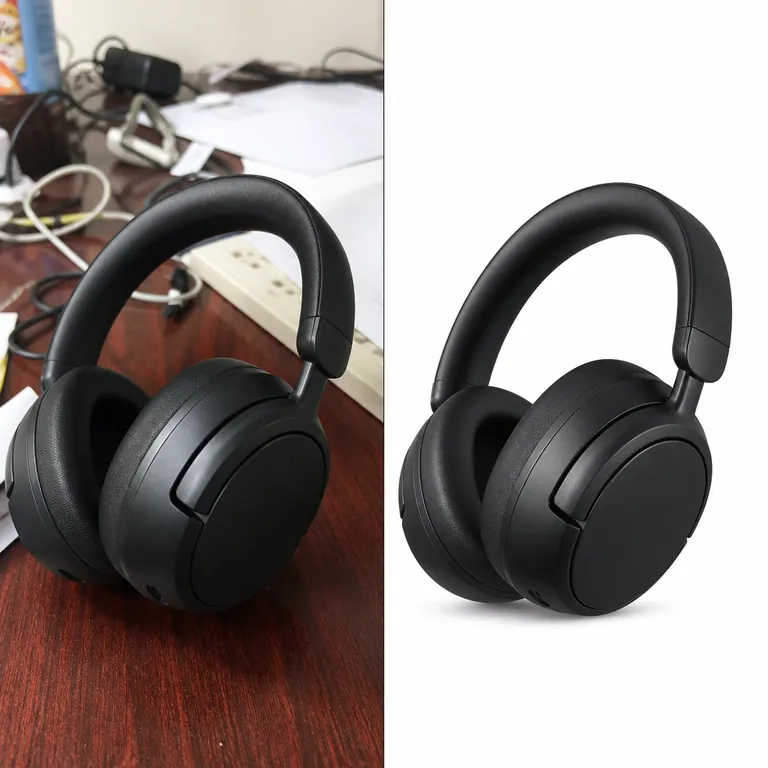
Cluttered desk photo → white ecommerce packshot
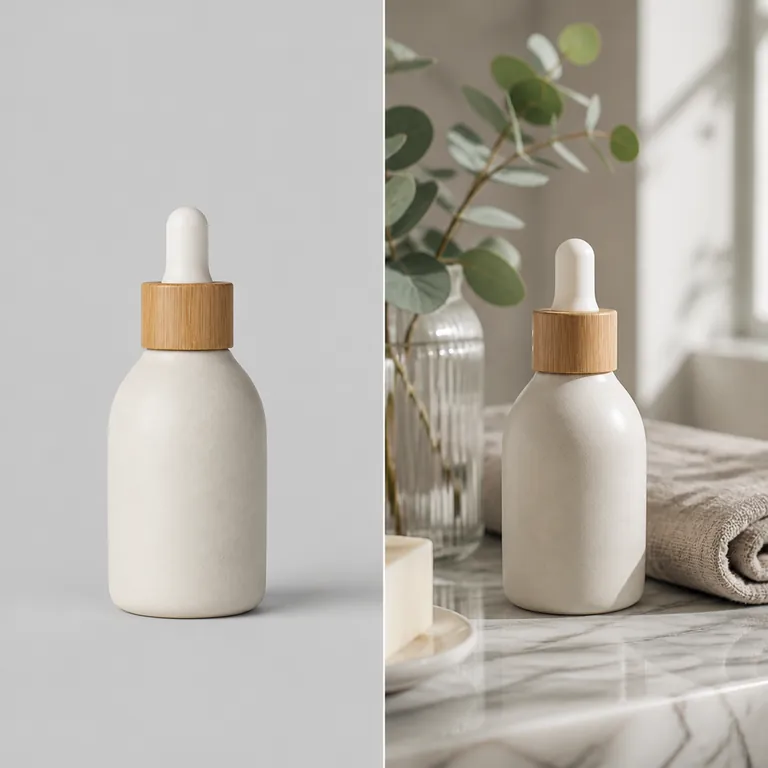
Plain backdrop → lifestyle bathroom scene
Use Cases
Store and marketplace listings
Give a set of products the same backdrop so the catalog looks consistent.
Key Benefits:
- •Plain white and light box scenes for main images
- •One scene reused across a whole range
- •No studio or reshoot needed for a new backdrop
Seasonal and campaign images
Put the same product into autumn, winter or holiday scenes for a sale or a launch.
Key Benefits:
- •Seasonal and nature scenes in the picker
- •Keep your original photo, change only the scene
- •Make several versions from one upload
Social posts
Pick the frame shape for the place you post before you generate.
Key Benefits:
- •Square and 4:5 for feeds
- •9:16 for stories and reels
- •16:9 for banners and headers
Frequently Asked Questions
More product photography guides
The main product background generator, plus guides for similar products and stores.
- Product background generator
Put any product photo into a new AI-made scene: white, studio, marble, wood, nature or seasonal.
- WooCommerce product photography
Boost your WooCommerce store's conversion rates with our AI background changer that creates professional, consistent product imagery.
- Amazon outdoor product photography
Boost your outdoor product sales on Amazon with our AI background generator that creates realistic nature settings or clean, consistent product…
- eBay product photography
Increase your eBay listing views and sales with our AI background generator that creates professional product images.
- Etsy stationery product photography
Showcase your paper products beautifully on Etsy with our AI background changer designed specifically for stationery sellers.
- Instagram product photography
Boost your social commerce with our AI background changer designed specifically for Instagram product posts.
- Amazon handmade jewelry product photography
Make your handcrafted jewelry stand out on Amazon Handmade with our AI background generator.